
Inspect is a mobile app built by Machinery Partner that replaces paper-based heavy equipment inspections with a digital workflow. Field technicians use it to inspect machines before and after delivery — scanning labels with AI, capturing photos, flagging issues, and generating reports — all without needing cell service.
I designed the product end-to-end: research, user flows, UI, and component system. Later, I refactored the entire UI in React Native.
My Role
Product design (end-to-end), field research, user flows, information architecture, mobile UI design, component system, React Native UI refactoring. Implementation partnership with Zazmic.
The Problem
In the heavy equipment industry, pre- and post-delivery inspections are mandatory. When I started this project, every inspection at Machinery Partner’s partner manufacturers was done on paper. Clipboards, printed checklists, handwritten notes, photos taken on personal phones and texted to someone in an office.
The problems were obvious once you saw them in person: paper gets lost, gets wet, gets illegible. Photos live on someone’s camera roll with no connection to the inspection record. If a damage dispute comes up three months later, good luck finding the documentation. And because every manufacturer has different inspection requirements, there’s no consistency in what gets checked or how it gets recorded.
The less obvious problem was the environment. These inspections happen at manufacturing plants, construction sites, and rural yards — places where you often have no internet connection. Whatever we built had to work completely offline and sync when connectivity came back.
Research
This wasn’t a project I could design from a desk. I visited manufacturer sites to watch inspections happen in real conditions:
Komplet in Italy — rubble recycling equipment. Watched technicians inspect crushers and screeners in outdoor yards, documenting their process and pain points.
Omega Crusher and Barford in Northern Ireland — crushing and screening equipment. Spent time with service technicians, shift supervisors, and managers to understand the full workflow from field inspection to office reporting.
What I learned from being on-site shaped every major design decision. Technicians wore gloves, worked in rain and dust, and had limited patience for anything that slowed them down. Managers wanted structured data they could search and reference months later. Administrators needed to create custom inspection templates for different equipment types without involving a developer.
I also explored emerging technologies — OCR for label scanning, AI-powered image recognition for part identification — to understand what could realistically be integrated to speed up the process.
What I Designed
The Core Inspection Flow
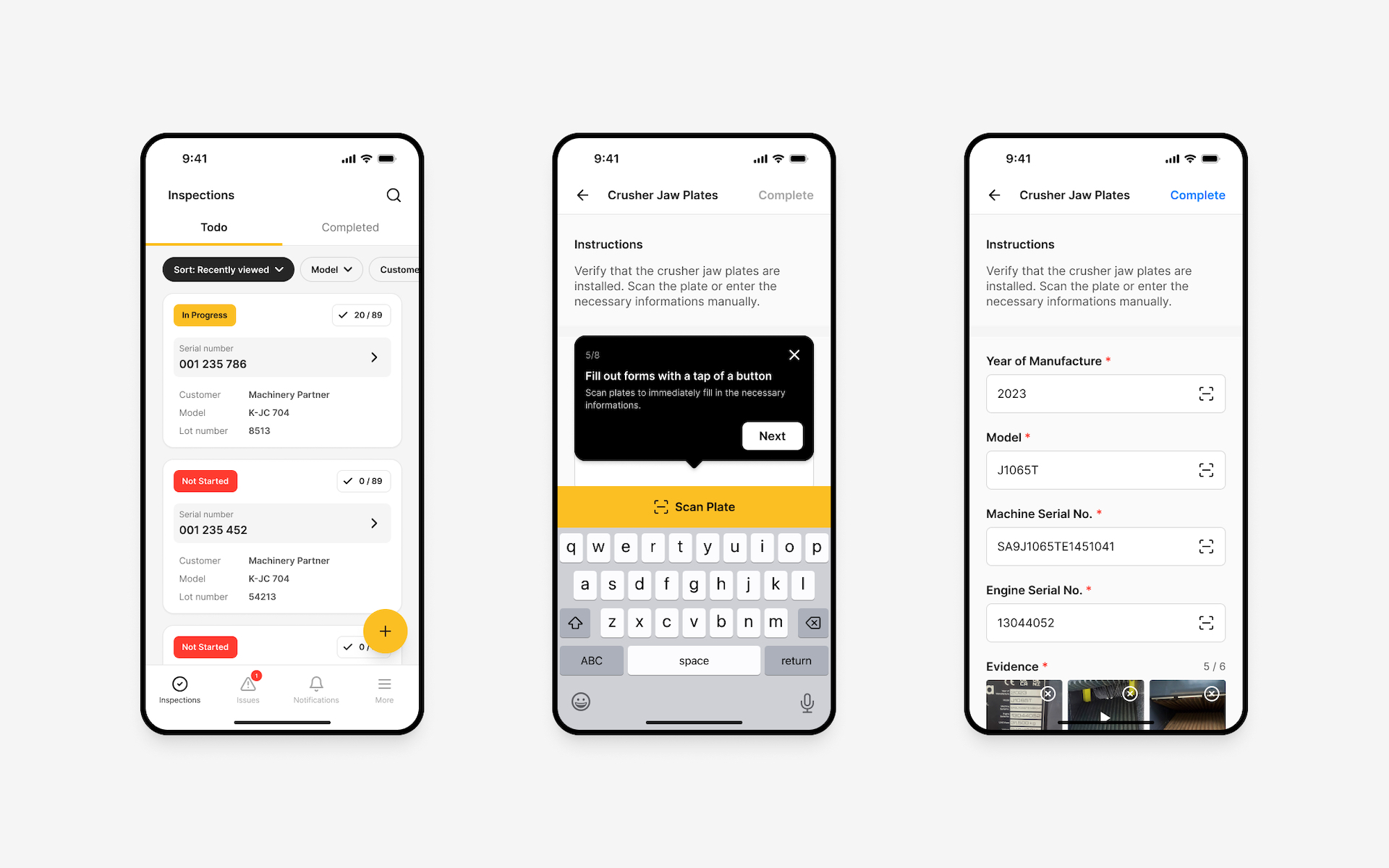
The central design challenge was making a digital inspection faster and easier than pen and paper — because if it wasn’t, technicians would reject it. Every screen was designed for speed: large tap targets for gloved hands, minimal text input, smart defaults, and a progress indicator so technicians always knew where they were in a long checklist.
The flow handles the full inspection lifecycle: select equipment, work through the checklist (with required and optional items), capture photos, scan labels and part numbers using AI/OCR, flag issues with severity levels, add notes, capture a digital signature, and generate a PDF report — all in one continuous workflow.
Offline-First Architecture
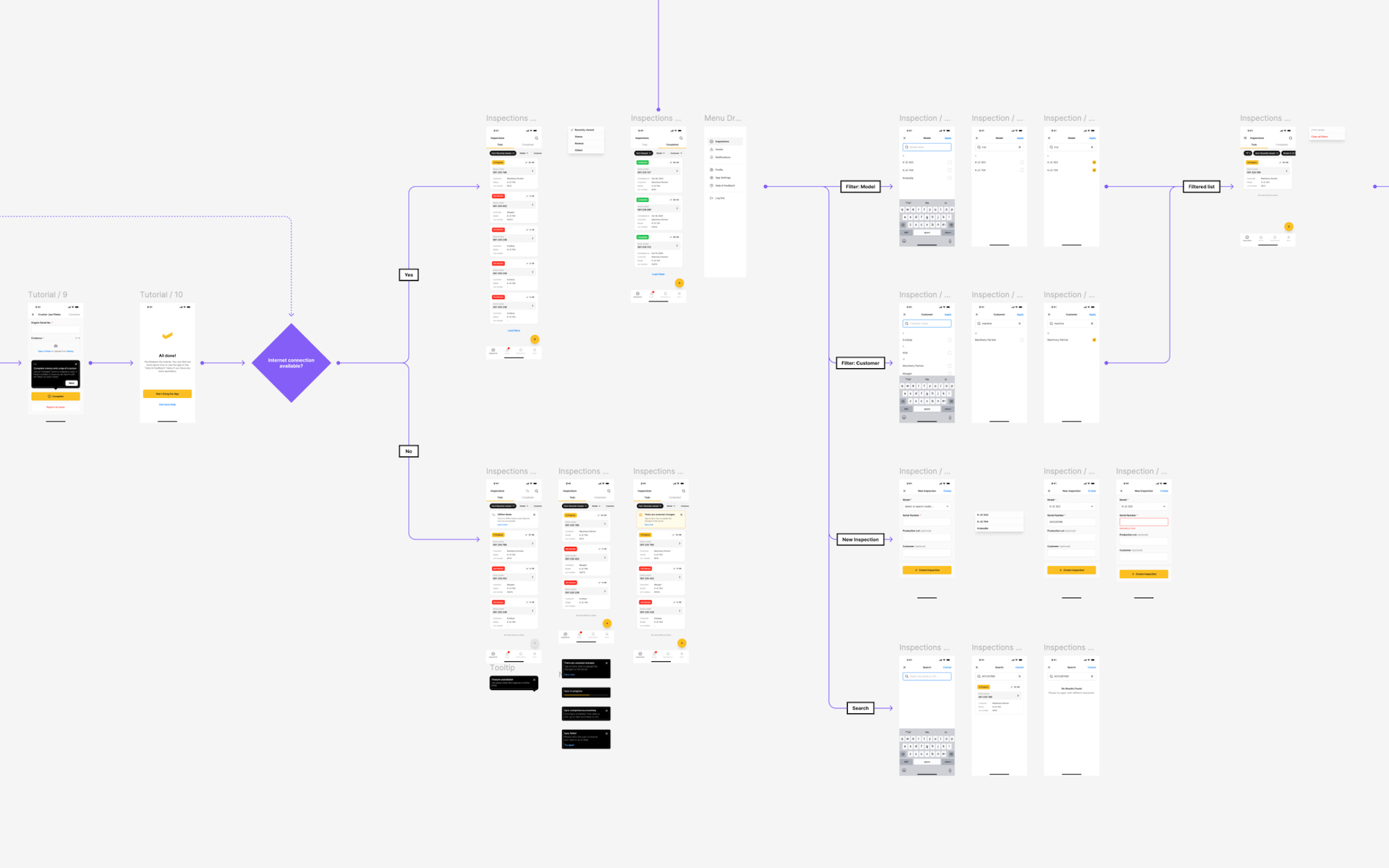
This was a hard technical constraint that shaped the entire UX. The app had to function with zero connectivity — not degraded functionality, but full functionality. Inspections, photos, signatures, everything. I designed the sync system’s user-facing layer: clear status indicators showing what’s synced and what’s pending, conflict resolution when data syncs after being offline for extended periods, and background sync that never interrupts the technician’s work.
AI & OCR Integration
I designed the scanning experience for label and part number recognition. Point the camera at a label, the AI extracts the relevant information, the technician confirms or corrects, and it’s attached to the inspection record. This replaced the old process of hand-copying serial numbers — which was slow and error-prone.
Custom Inspection Templates
Different equipment types need different inspection checklists. A crusher inspection looks nothing like a conveyor inspection. I designed the admin interface so managers could create and modify inspection templates themselves — defining checklist items, required photos, severity options, and conditional logic — without needing engineering support.
Reporting & Communication
When an inspection is complete, the app generates a PDF report automatically. If issues are flagged, real-time notifications go to the relevant managers. All inspection data is searchable and filterable from the admin dashboard — so when that damage dispute surfaces months later, the record is there with photos, timestamps, and signatures.
The React Native Refactor
After the initial version shipped, I went back in and refactored the entire UI in React Native. This wasn’t a redesign — the UX was solid — but the implementation needed to be tighter, more consistent, and better aligned with the component system I’d established. I cleaned up the codebase, standardized components, and improved performance, especially around image handling and offline storage.
Impact
- Replaced paper-based inspections entirely at partner manufacturer sites
- Full offline functionality — inspections work without any cell service
- AI-powered label scanning eliminated manual serial number transcription
- Real-time issue reporting connected field technicians directly to management
- Searchable digital records replaced lost paperwork and scattered photos
- Standardized inspection processes across different equipment types and manufacturers
What I Learned
This was the project that proved to me that you can’t design field tools from an office. Every assumption I had about the UI changed after watching a technician try to tap a button while wearing work gloves in the rain. The on-site research wasn’t a nice-to-have — it was the difference between a product that works and a product that gets ignored.
It also taught me something about the relationship between design and code. When I came back to refactor the UI in React Native, I could see exactly where the gap between my designs and the initial implementation had created friction. Being the person who closes that gap — who designs it and then makes sure it’s built right — is the kind of work I want to keep doing.